Eligibility Based on Medical Plan Election
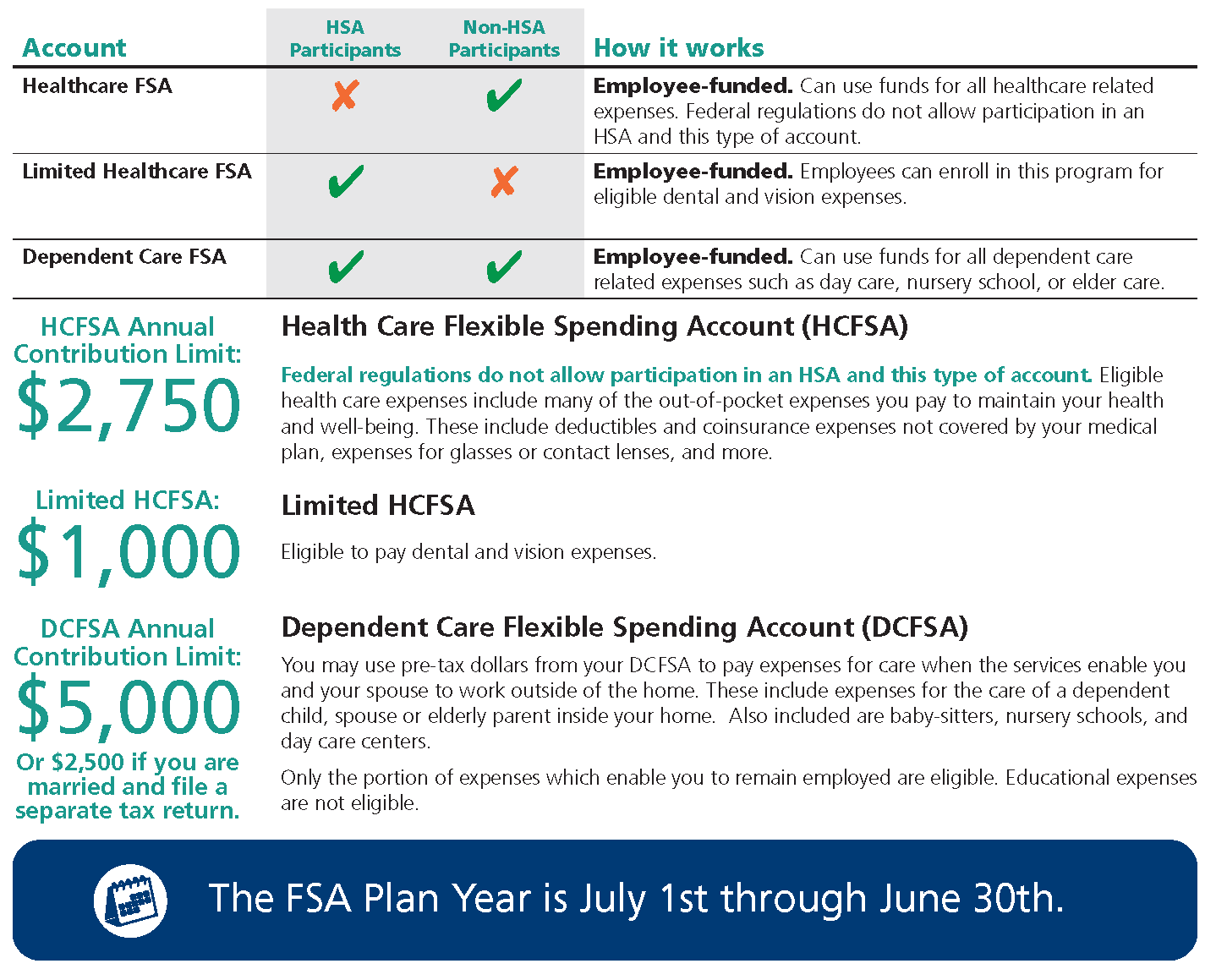
Flexible Spending Accounts (FSA’s) offer another way to save money on health care and dependent care expenses. You may submit expenses incurred by any of your dependents, whether or not they are covered by the insurance plans you have through your employer. Employees need not be enrolled in either medical plan to participate in FSAs.
If you enroll, you fund the accounts via a payroll deduction each pay period. Money that you contribute to your FSAs is not subject to social security taxes, federal, and in most cases, state income taxes.
Please note: The CARES Act was recently signed into law and permits plan participants to purchase OTC medicines and products with their HCFSA (excludes Limited Healthcare FSA). This feature was lost to plan participants in 2011, when the Affordable Care Act (“ACA”) limited the purchase of OTC products to plan participants with a prescription. Now that the CARES Act is law, you may begin to use your HCFSA monies for these OTC purchases. Further, the CARES Act extended the list/category of included items to include menstrual care products.
Reimbursements for purchases made on or after December 31, 2020 are eligible for reimbursement through paper submissions, web-submissions, or app-based claims-submissions and are subject to all the usual claims submission deadlines, rules, etc. If you previously filed a claim and were denied for lack or a prescription, etc., please submit a new claim at this time.
Eligible Dependents
In regards to your Dependent Care FSA, the IRS defines an eligible dependent as:
- A child under the age of 13 and may be claimed as a deduction for personal exemption under Code Section 151(c).
- A spouse who is physically or mentally incapable of self-care.
- A disabled person who is physically or mentally incapable of self-care who you provide more than 50% support, and who qualifies as your dependent under Code Section 152.
FSA Claims & Reimbursements
Current Account Users
Requests for reimbursement from your FSA may be made online at https://apbenefitadvisors.wealthcareportal.com or by completing a claim form. Claim forms can be faxed to AssuredPartners at 410-771-9487, along with proof of expenses (i.e. receipts from your dependent care provider) detailing provider name, date expense incurred, and description of service. Reimbursements are generally distributed through payroll.
New Account Users
- Please visit https://apbenefitadvisors.wealthcareportal.com to register for the FSA website.
- Enter a User Name meeting the minimum requirements.
- Enter a Password meeting the minimum-security requirements. Please do not use your name in the password.
- Confirm Password.
- Enter your First Name and Last Name as they were provided to your employer at enrollment. No suffixes or commas.
- Provide an Email Address.
- For Registration ID use the Employer's ID, which is CRWAUTHORITY.
- Enter your Employee ID (your Social Security Number).
- Click I accept Terms of Use.
- Click Next.
Go to the "Communication" Tab, then click "Communication Preference" in the dropdown.
Changing Your Contribution Amount
Federal regulations prohibit you from changing your enrollment or the amount of your election during the plan year. You are only eligible to change your elections during the year if you have a qualifying life event status change. Only benefit changes consistent with the change in status are permitted. Life event status changes that may warrant a change in benefit elections are described on page 4 and 5 of your benefit guide.





.jpg?width=5472&name=shutterstock_1284992617%20(1).jpg "shutterstock_1284992617 (1)")